Draft patterns on screen, watch them hang in 3D, and run the whole class in one place: classwork, exams, files and grades. Free for schools, teachers and creators, with no limit on students.
Nothing to install. In Spanish, Portuguese, English and Chinese. Built on GarmentFlow, the production software for garment factories.
Simulated in the browser
real 3D!
Learn on the tools and technology they will use
Set your students up for success
Every garment company your students will work for drafts, grades and checks its patterns on software. When they have used it in class, their first week at work is about fashion, not about learning where the buttons are.
A portfolio that gets them hiredThey leave with digital patterns graded in every size, flats and tech packs they can open in front of an employer, not photos of paper.
Confidence from the first dayThe Pattern Editor, the 3D view and the tech pack are the tools of GarmentFlow, the software garment factories use. Nothing new to learn when the job starts.
The whole garment, not only the drawingThey see how a line changes the fit in 3D and how much fabric a pattern really takes: the questions a production team asks every day.
Who it is for
For everyone who teaches fashion
A university with a whole faculty, an academy that opens a new group every month, a teacher with a workshop, a YouTuber with thousands of followers: Campus gives each of them the same classroom, and their students the same tools.
Keep drafting on paper if that is how your class learns best. When a pattern is ready, Pieces from a Photo brings it in: lay the paper pieces on the printed pattern board, take a picture with any phone, and in a few clicks they are pieces on screen, at their true size.
From there the paper pattern becomes everything a paper pattern can't be: graded in every size, checked in 3D, shared with the teacher, and kept in the student's portfolio. Pattern software usually means expensive licences on every computer; Campus is free and runs in the browser, on the computers your school already has.
1
Draft on paper, as always
Your students keep the skills of the pattern table: the ruler, the curve, the notch.
2
Photograph it with any phone
On the printed board, the photo is read at true size and every piece comes in with its outline.
3
Grade it, fit it, share it
Sizes, 3D, fabric use and the teacher's grades, on the same pattern they drew by hand.
Drafting, step by step
Watch a pattern draft itself
Choose a block (a bodice, a skirt, trousers, a dress), give it the body measurements, and Campus drafts it in front of the class the way it is done on paper: the frame first, then every point with its letter, every line, every curve.
Each step is explained with its numbers, so students follow why the crotch extends where it does or how a dart is placed, and can pause, look at any step again and try it themselves. At the end the block becomes real pieces, ready to change, grade and see in 3D.
Trousers block, drafted live
3D and fit maps
Catch the problem before you cut
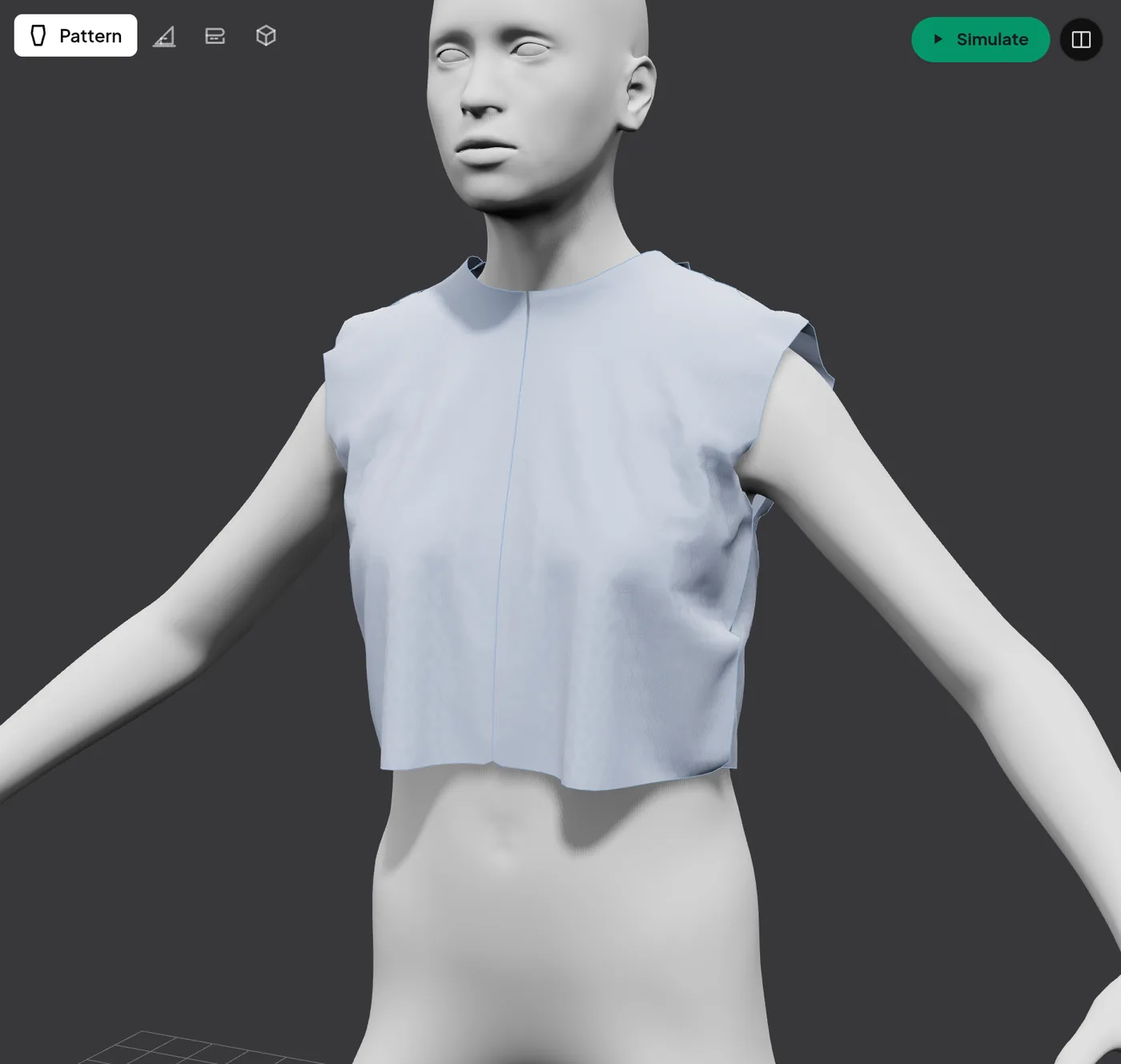
Speed up prototyping: put the pattern on a 3D body and see what is wrong before anyone cuts fabric. A tight shoulder, a neckline that pulls, a hem that hangs short: students find it on screen in minutes, not after a fitting a week later.
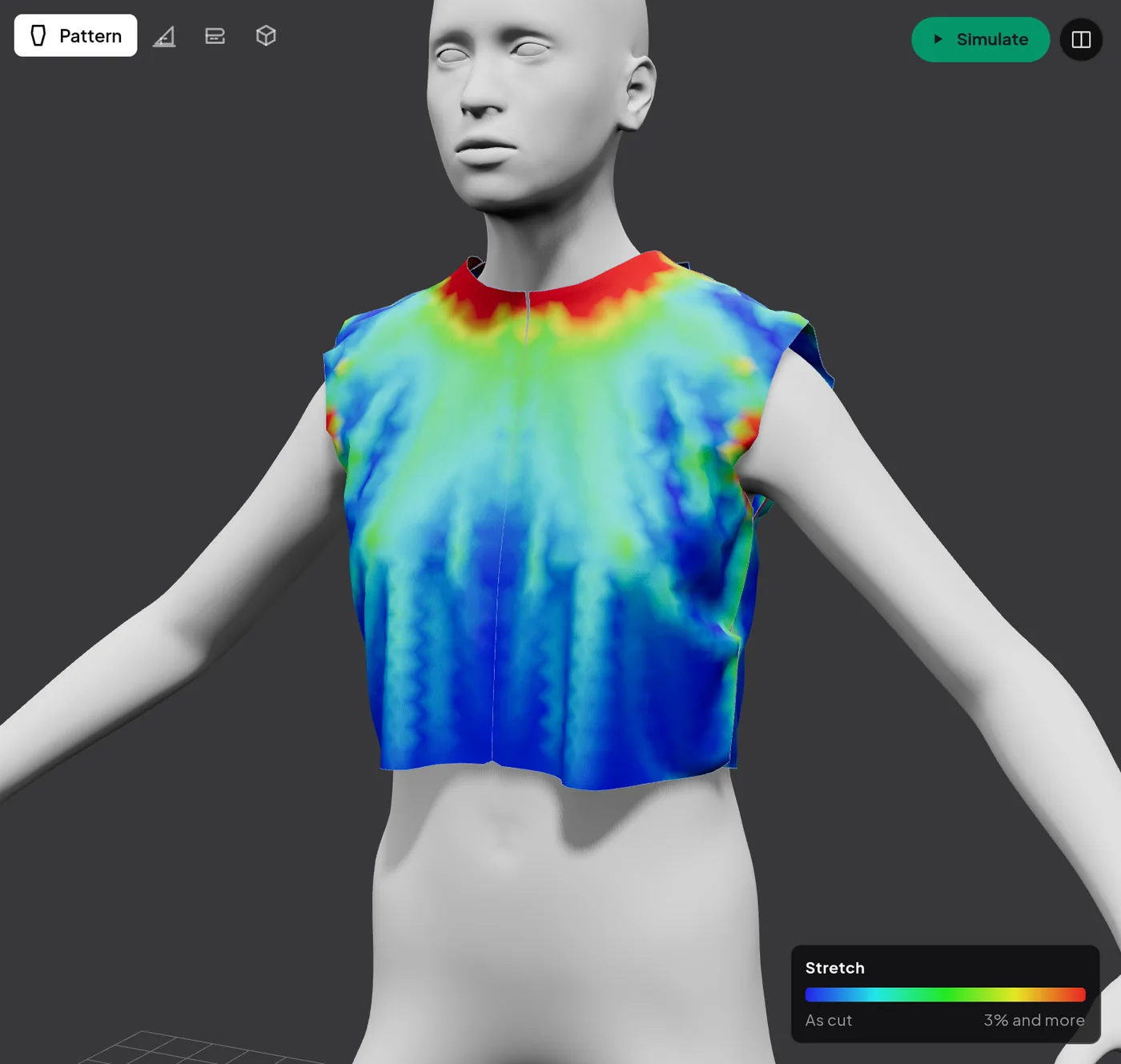
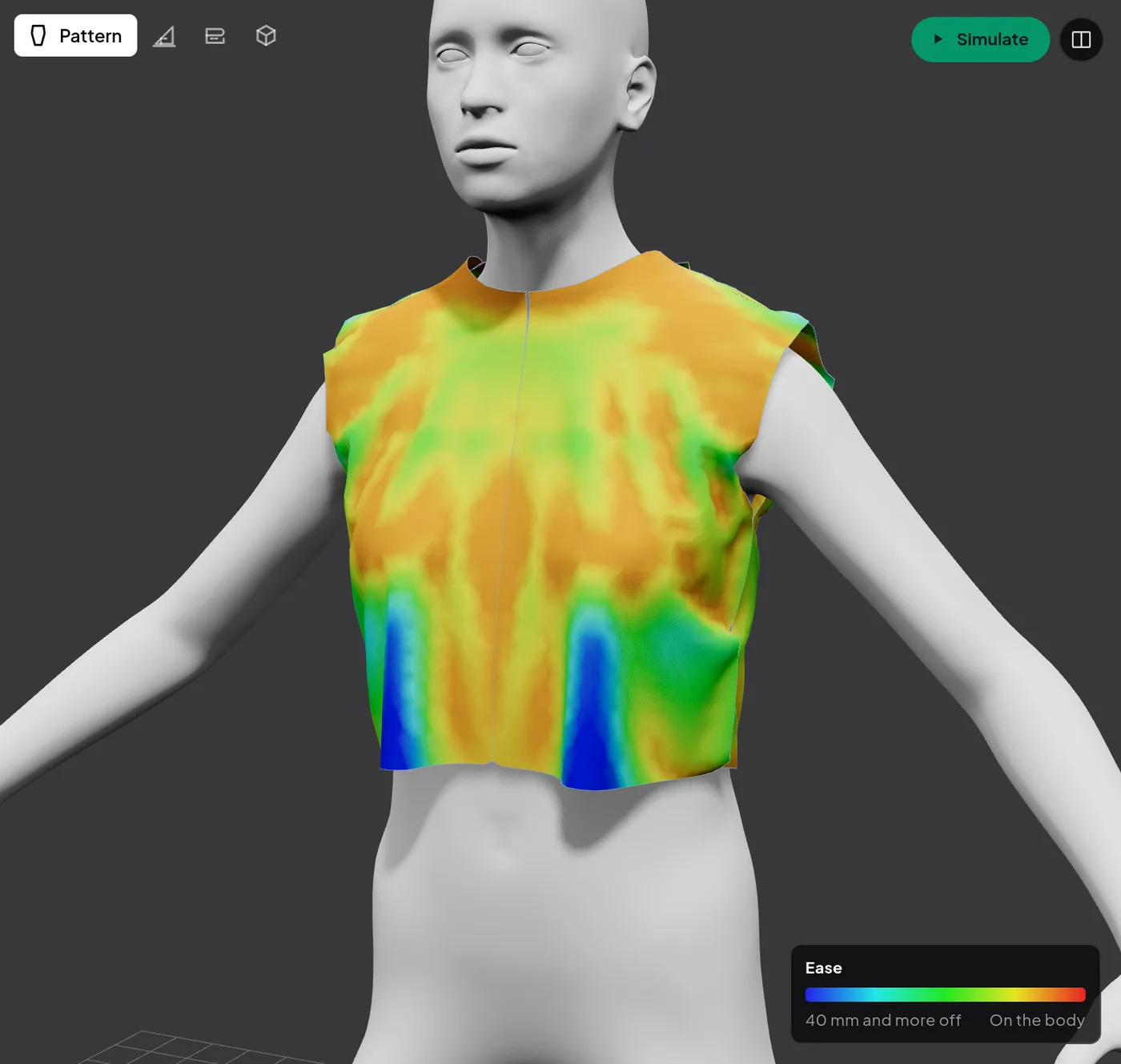
The drape uses the fabric's weight, stiffness and stretch, so a jersey and a denim hang differently, as they do in real life. Then the fit maps point to the exact spot: change the line, drape again, and watch the red go away.
Stretch Red where the cloth is pulled past what it gives: a shoulder too narrow, a chest too tight.
Ease How far the cloth stands off the body, from touching it to 4 cm away.
Man, woman, boy or girl, by size and age
The fabric's weight, stiffness and stretch
Every size from XS to XXL on the body
3D off for an exam drafted by hand
Fabric use, simulated
Watch the pieces find their place
Simulate lays every piece on the fabric, size by size, the way a cutting room plans a marker, and keeps moving them until they fit tighter. Students see how much fabric their pattern really takes, and what a change in a line costs: a wider leg, a deeper hem, one more piece.
Real fabric width and shrinkage
Every size and how many of each
Centimetres per garment and % used
Recorded live in Campus
Fashion flats
Draw the flat, front and back
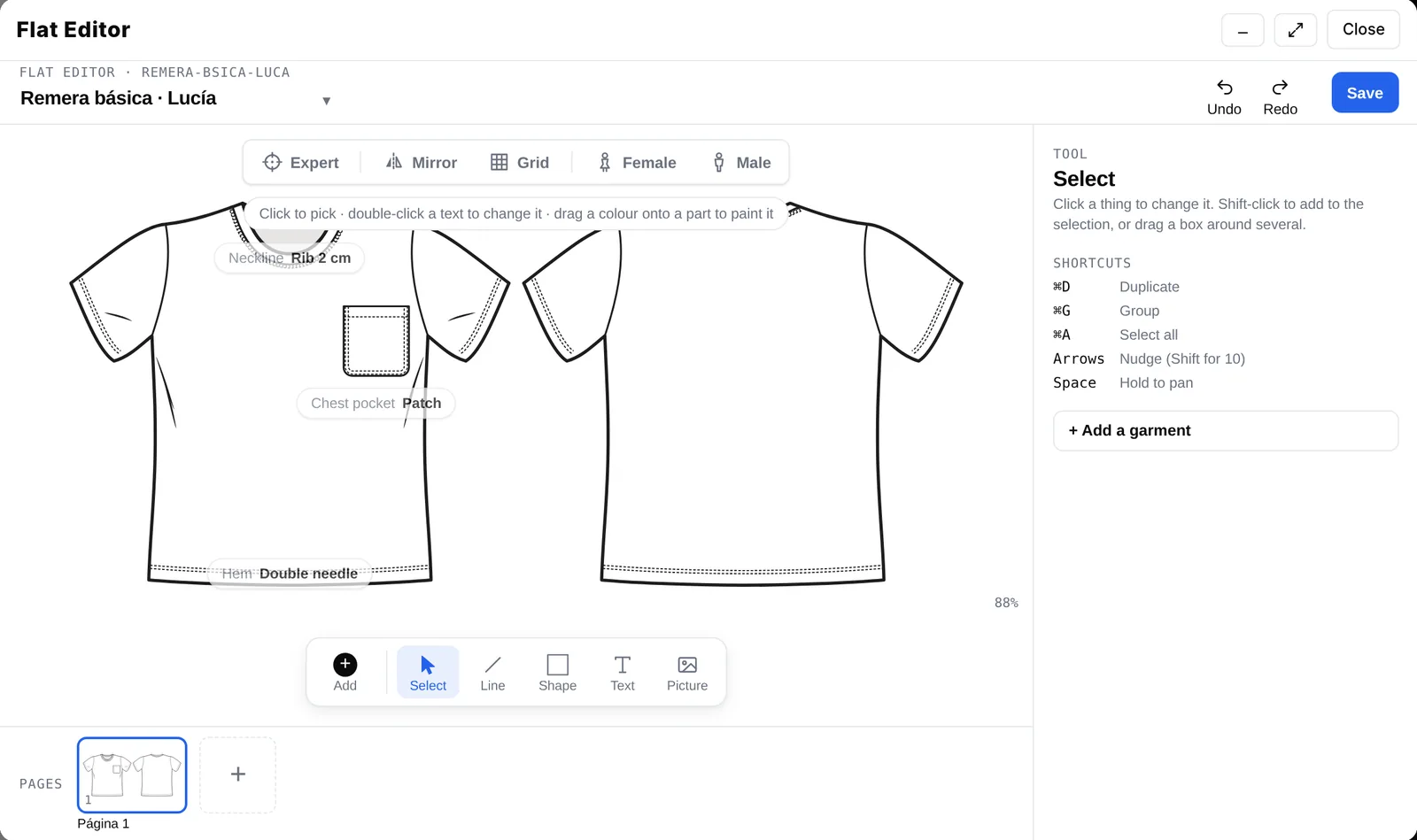
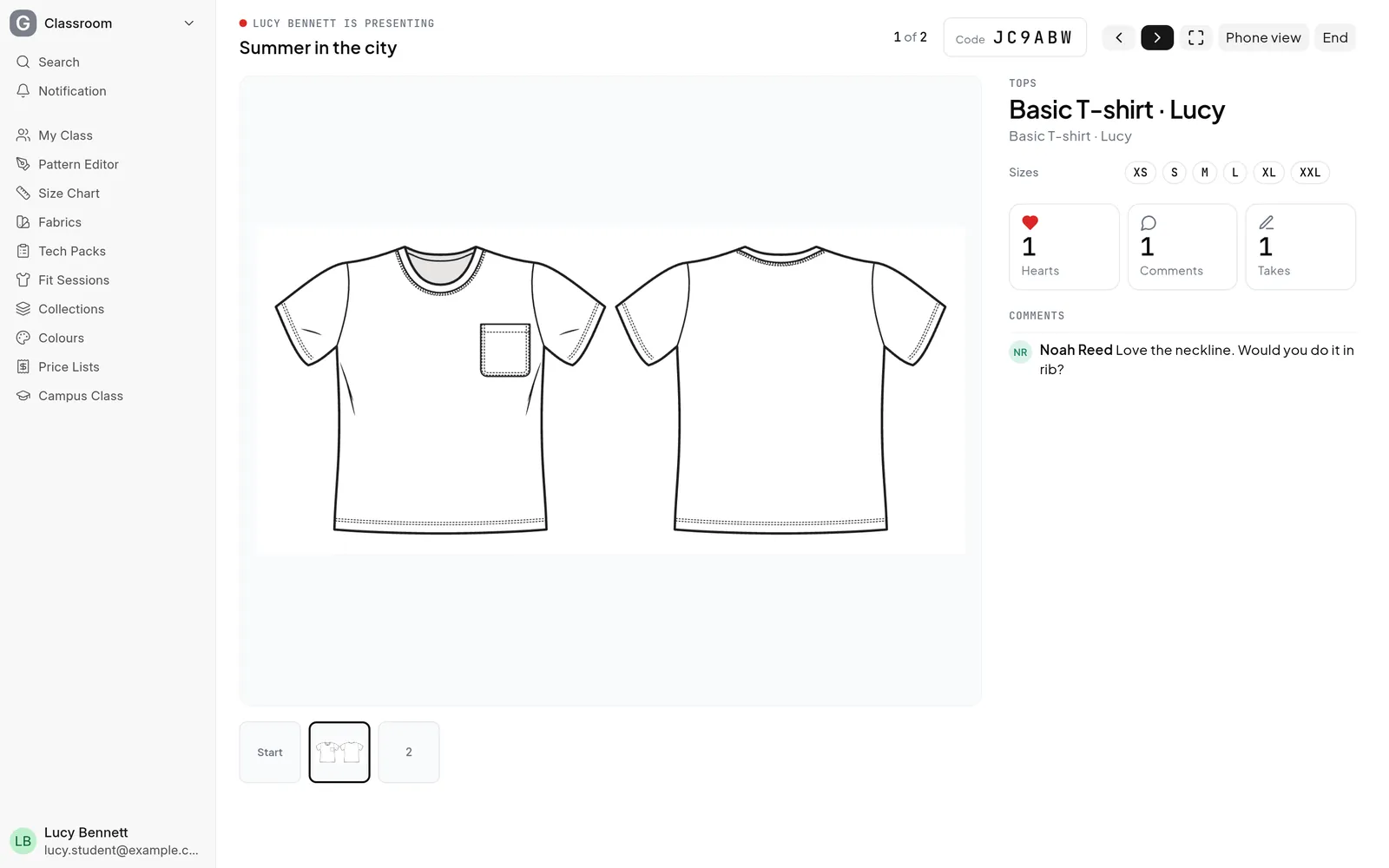
The Flat Editor draws the garment the way the industry reads it: front and back, every seam, stitch and trim. Students start from a body (feminine or masculine), mirror one side to the other, and call out the details that matter: a 2 cm rib collar, a patch pocket, a double-needle hem.
The flat becomes the pattern's picture: it goes on the tech pack, into the collection they present to the class, and onto their public portfolio. One drawing, used everywhere the garment goes.
The classroom
Everything you need to teach. Everything they need to learn.
The design tools and the classroom in one place: share files, set work, grade it on the pattern itself, and keep every class, deadline and grade in order. Real screens from a demo class.
Classwork and exams
Plan the course unit by unit
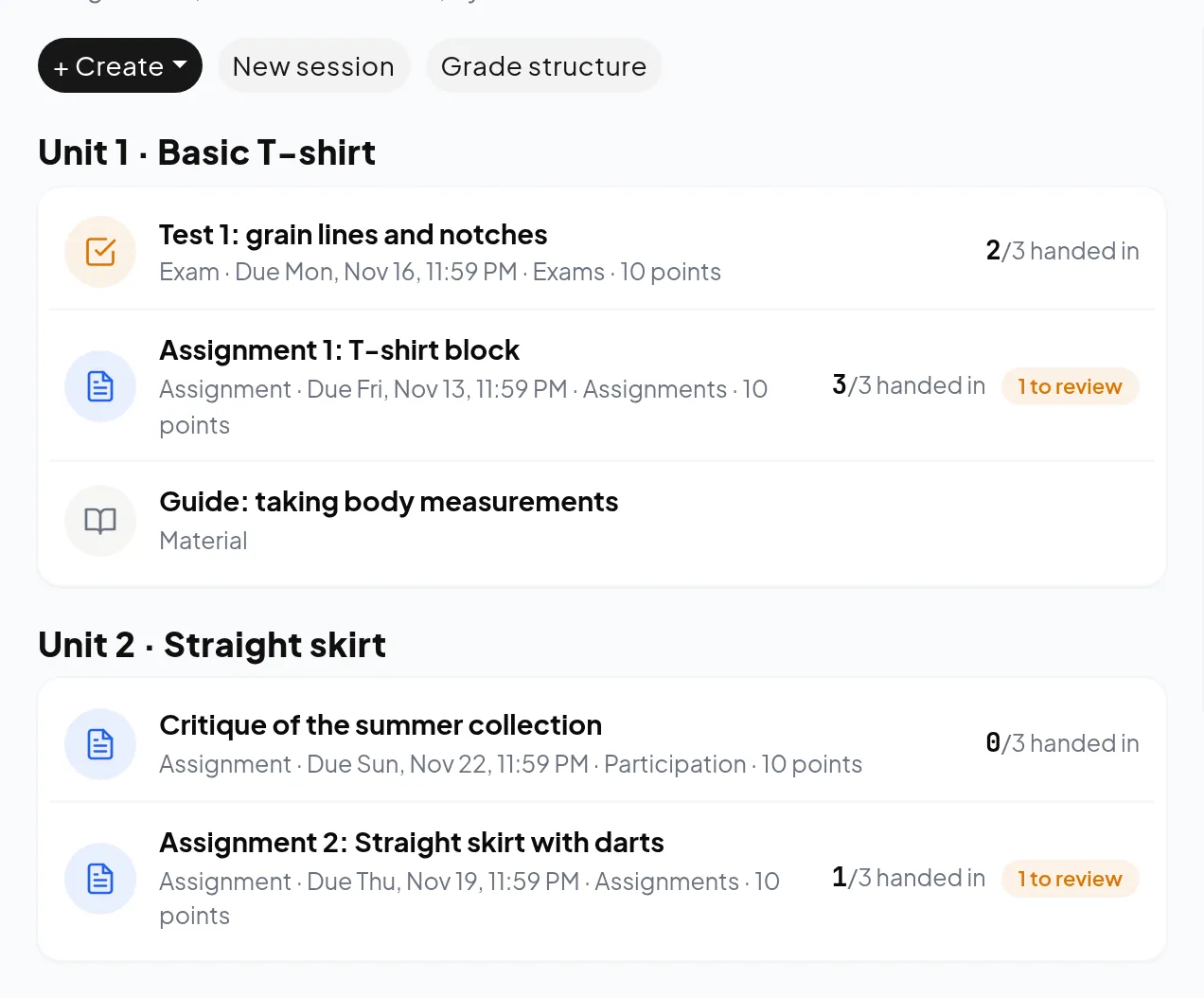
Set assignments, share material and run timed exams, grouped by unit so the course reads like a syllabus. Each task has its due date and its points, and can hand every student their own copy of a pattern to work on.
Assignments, material and timed exams
A pattern for every student, in one click
Copy classwork to next term's group
Files, PDFs and videos
Everything they need, next to the task
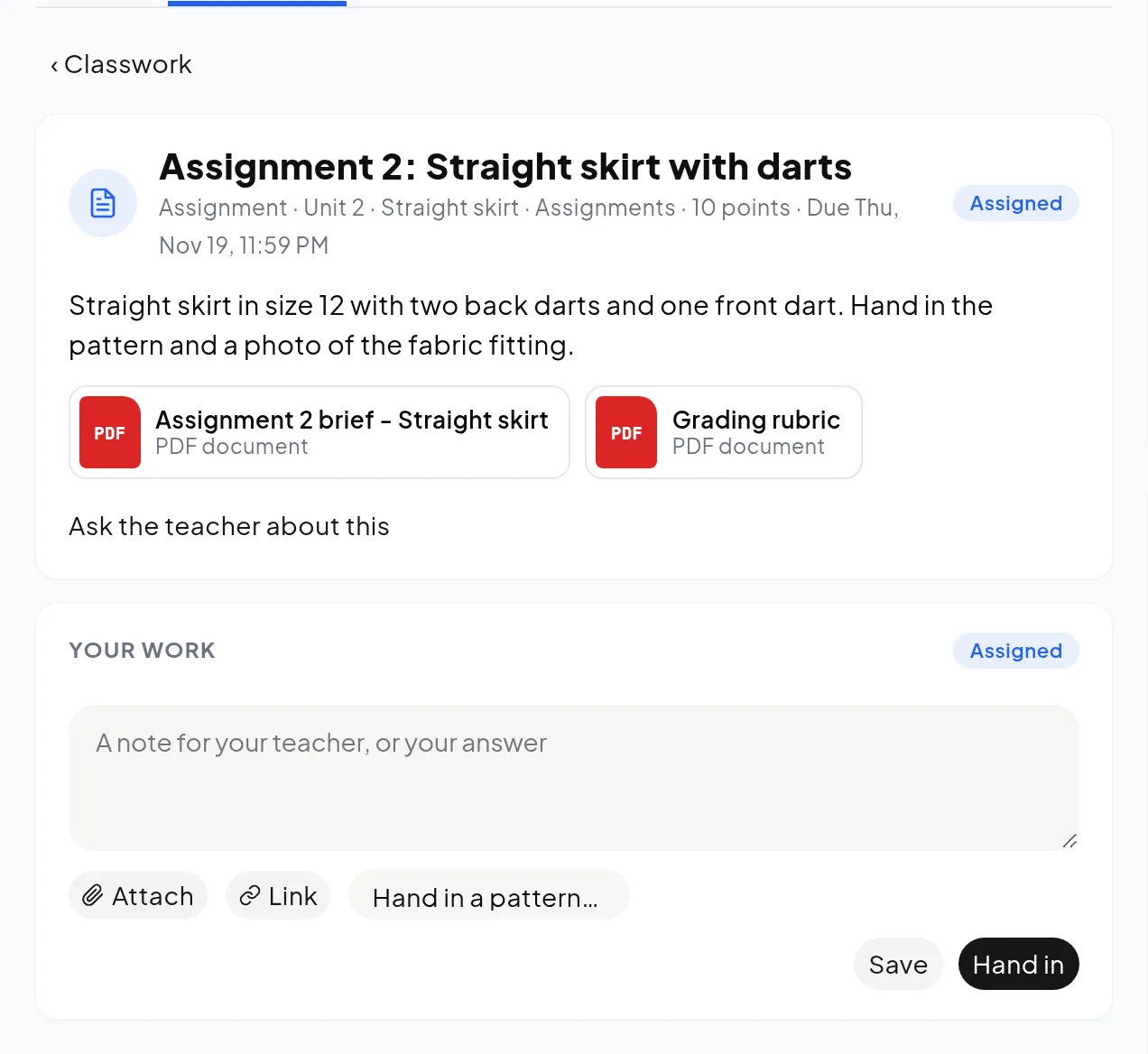
Attach the brief, the rubric, a size chart or a video to any task, post or exam. Students open it in one click, write their note and hand in their pattern or their files from the same page: no lost emails, no missing attachments.
PDF, Word and Excel, pictures, videos and links
Hand-ins with patterns and photos
Everything kept with the class
Board and questions
Questions answered once, for everyone
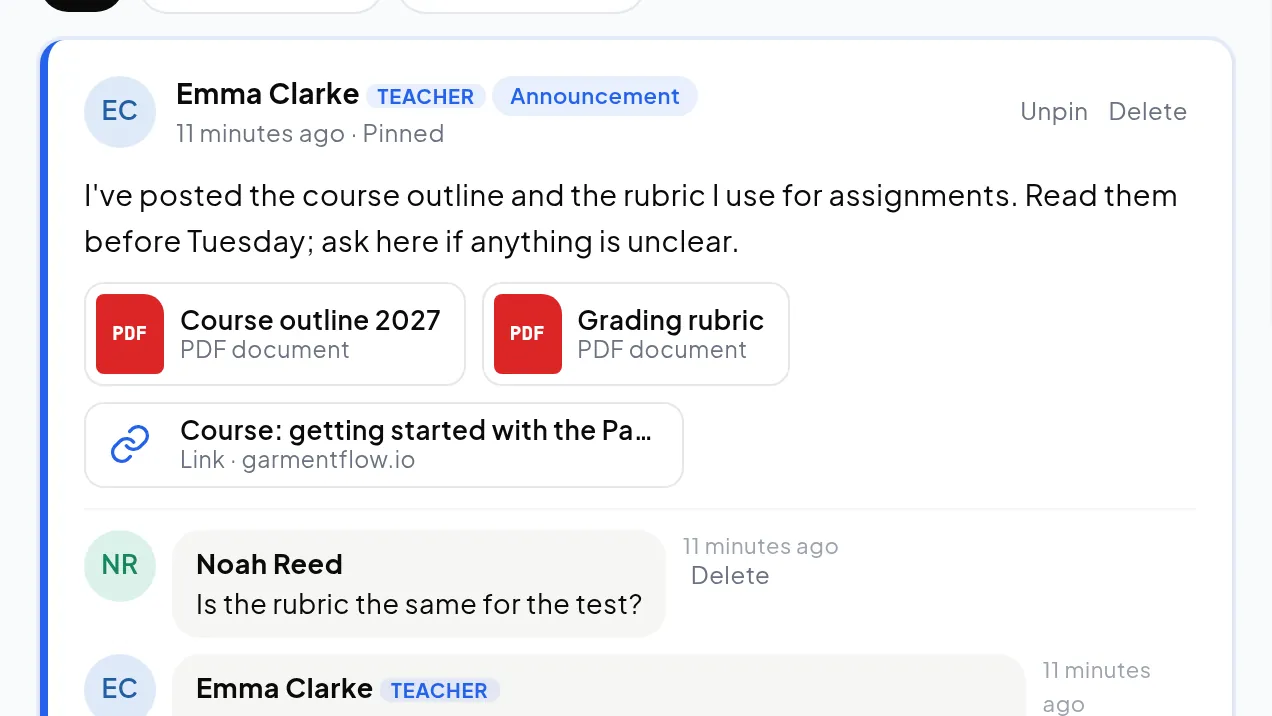
Announcements, posts and questions live on the class board. Students can ask in public or privately to the teacher; when the teacher answers, the answer is marked so the next student who wonders finds it straight away.
Pinned announcements
Private questions to the teacher
The right answer marked for the class
Grades on the pattern
Correct the pattern where the mistake is
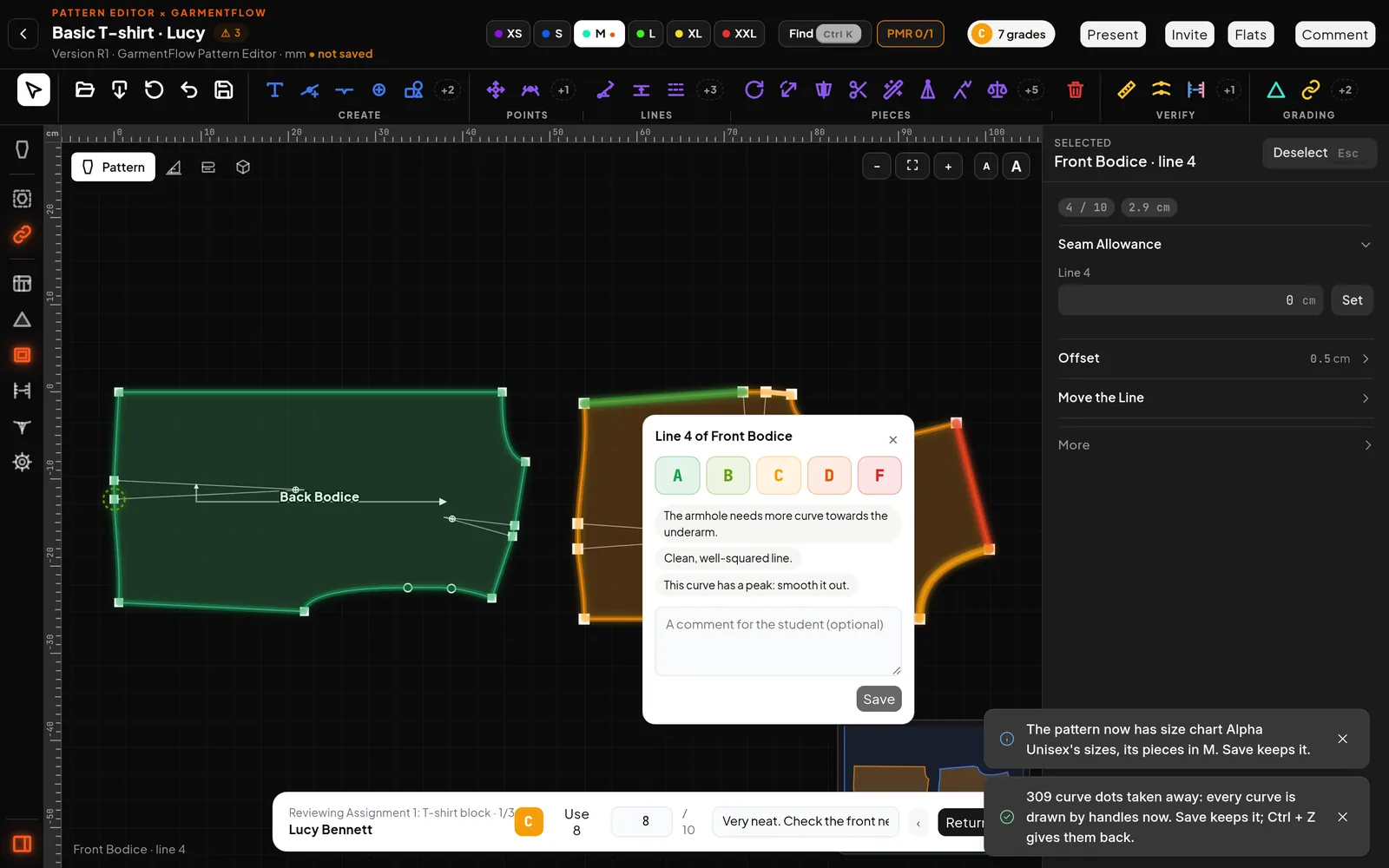
Select a piece, a line or a point and grade it from A to F with a comment. The grade glows on the pattern in its colour, the student sees exactly what to fix, marks it fixed, and the teacher checks it again.
A to F on pieces, lines, points and grading
A bank of ready comments
Review every hand-in in turn without leaving the editor
Gradebook and attendance
Know who needs help before the exam
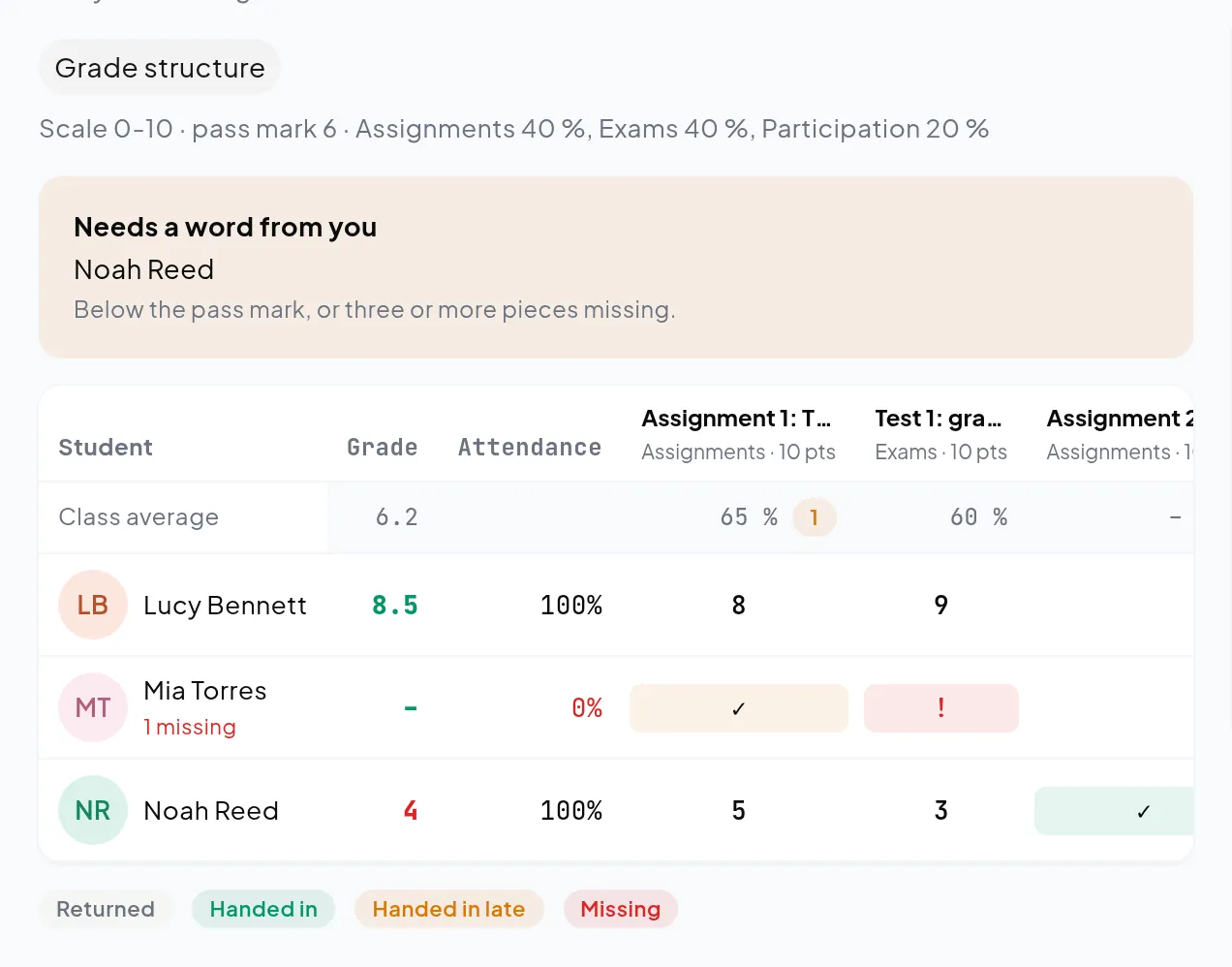
Every score and every session's attendance in one table, weighted by your own categories and scale. Campus lists the students under the pass mark at the top, so help arrives in time, and each student sees their grades and what to work on.
Your scale, pass mark and categories
Attendance per session
Students below the pass mark first
Calendar
Every class, every deadline
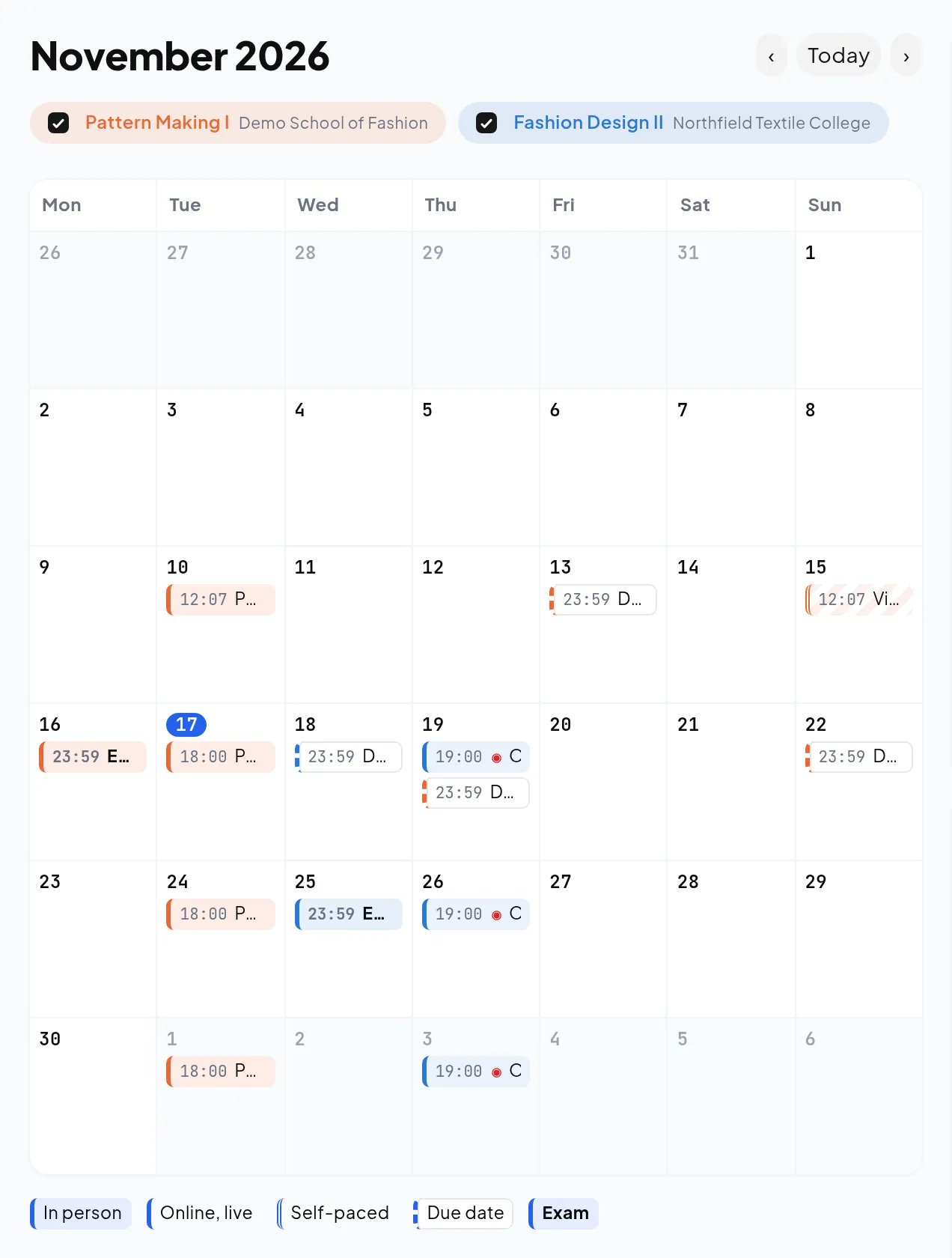
Sessions, deadlines and exams from every class appear in one calendar, even classes at different schools. Each session says whether it is in person, online with a link, or self-paced with a video.
One calendar across classes and schools
In person, online or self-paced
Today's class on the home page
Invitations
Let in exactly who should be there
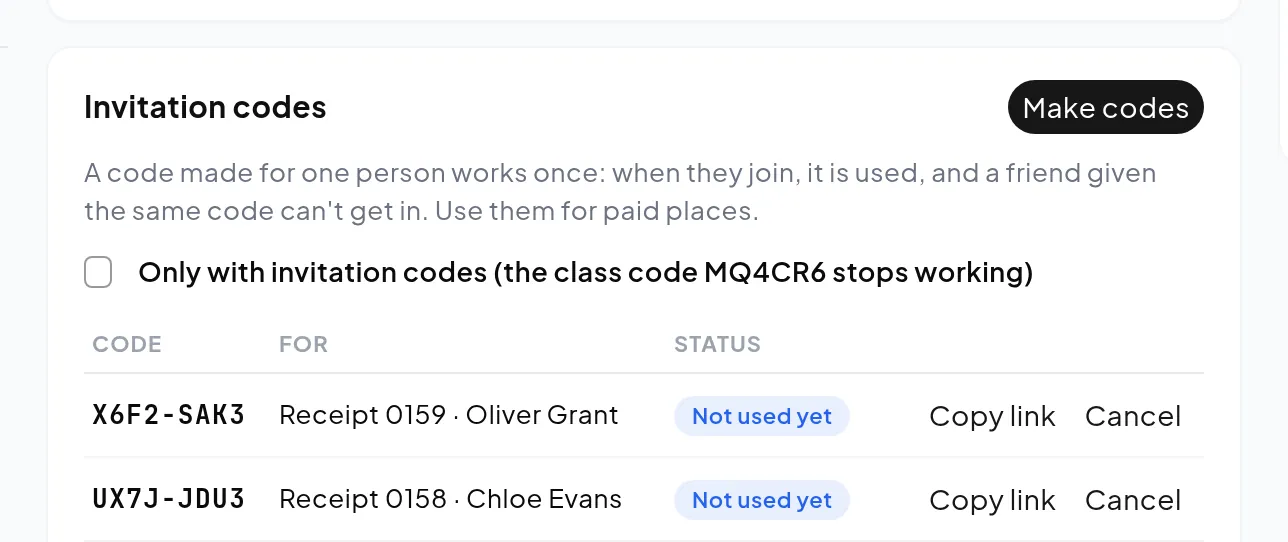
Share the class code with everyone, or make one-time codes for paid places: each lets one person in, once, and shows who used it. Switch off the shared code and only invited students get in.
A class code or one-time codes
Who each code is for, and who used it
No limit on students
From the screen to the runway
Present it, fit it, improve it
The same pattern, flat and tech pack tools GarmentFlow gives garment factories, set up for teaching: students present their collections to the class, and every sample they sew is measured against the pattern.
Collections Students gather their styles into a collection and present it on the classroom screen. Classmates join with a code, leave hearts and comments, and say keep, rework or out.
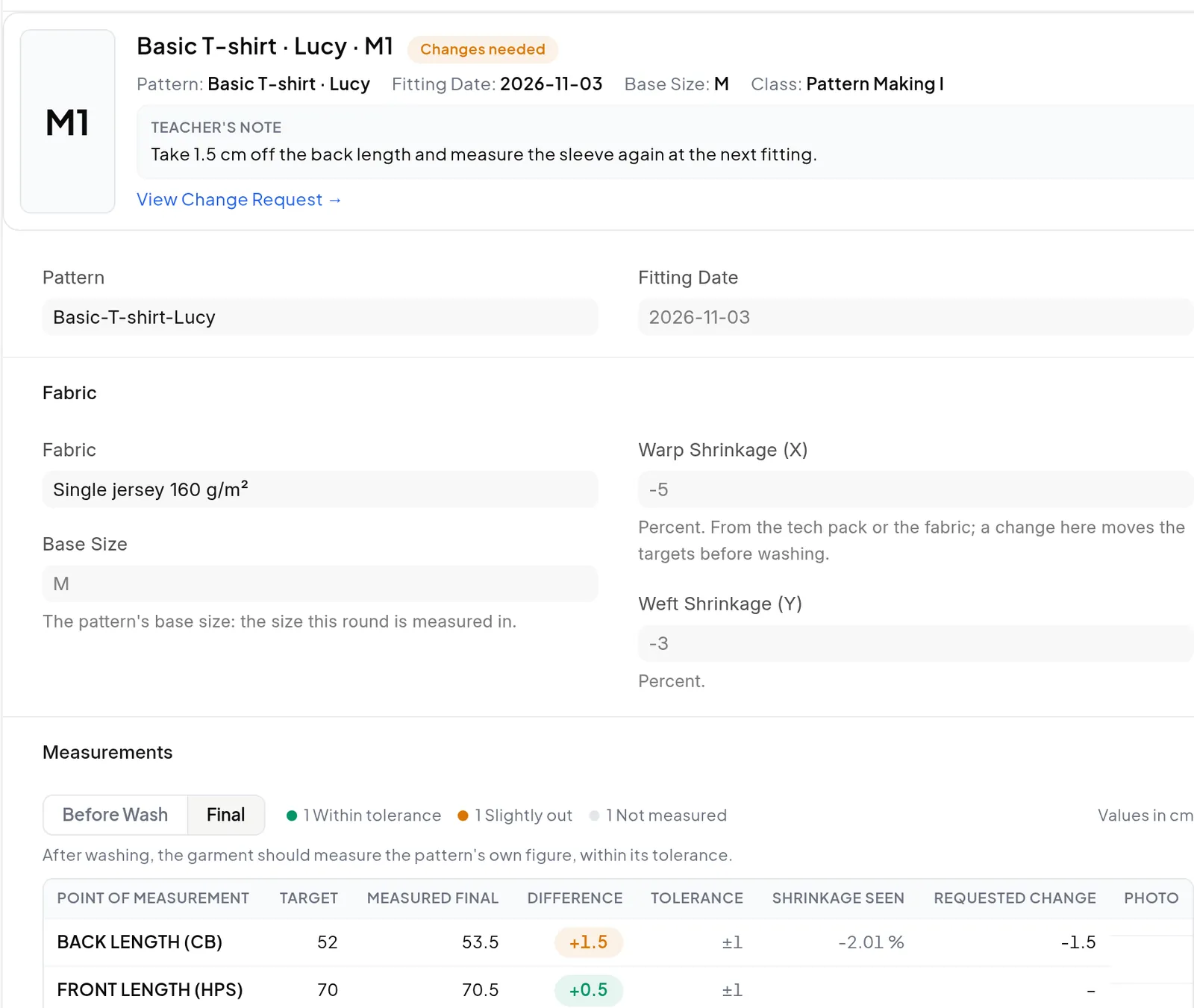
Fit sessions A fit session records what the sample measured against the pattern, and the teacher's note says what to change before the next fitting.
Pricing
Teach for free.
Both plans have the classroom, the design tools and the live class, with unlimited classes and students. Pro takes more students into the live class at a time, and lets you join a student in their own pattern.
Free
$0 for approved schools, academies, teachers and creators
A class can be as big as you like. The limit is only on the live class: every change goes to everyone in it at once, so the seats keep it fast. When it is full, the next student works on their own copy and joins when a seat frees up.
Prices in US dollars. You can move between plans at any time; your classes and work stay as they are.
After the course
From the classroom to the factory
Campus is the teaching edition of GarmentFlow by INDOPAR, the production software garment factories run on. Your students learn the same pattern, flat and tech pack tools they will find at work, and take their patterns with them.
Graduates who already know the software their factory uses
The same account opens GarmentFlow Academy, with free courses
A brand or a workshop of their own can start on GarmentFlow
Anyone who teaches fashion design, pattern making or sewing: universities, technical institutes, academies and short courses, independent teachers, and YouTubers or online creators.
Our school has no pattern software. Is Campus for us?
Yes, that is who it is for. Many schools still teach pattern making only on paper because licences are expensive and need installing on every computer. Campus is free and runs in the browser, so a class can go digital on the computers it already has.
Does Campus have 3D?
Yes. Students put their pattern on a 3D body, drape it with the fabric's weight and stretch, and switch on the fit maps: Stretch shows in red where the cloth is pulled past what it gives, Ease shows how far it stands off the body. A teacher can turn 3D off for an exam drafted by hand.
I teach on YouTube. Is Campus for me?
Yes. Put your class code in the video description: followers join for free, get the episode's pattern and ask their questions on the class board. There is no limit on students.
Does it cost anything?
Free costs nothing for approved schools, academies, teachers and creators, or for their students, and includes the live class for 5 students at a time. Pro is $50 a month and takes 15 students at a time in the live class.
Is there a limit on students or classes?
No. Both plans have as many classes, students and teachers as you need.
What does Pro add?
A bigger live class, and working with a student in their own pattern. In a live class the students work on the teacher's pattern at the same time, one piece each: Free takes 5 students at a time, Pro 15. With Pro, a teacher can also open a student's pattern and fix it with them.
Why is the live class limited when the class isn't?
A class can have as many students as you like. In a live class every change goes to everyone in it at once, so the number working live together is what the connection carries. When it is full, the next student works on their own copy and joins when a seat frees up.
Can I share PDFs, videos and documents with the class?
Yes. Attach PDFs, Word and Excel files, pictures, videos and links to a post, a task or an exam. Students attach their files and patterns when they hand in.
Is it pattern-making software or a virtual classroom?
Both, in one place. Students draft and grade patterns, draw flats and build tech packs, and the same classroom holds the classwork, the calendar and the grades.
Why is every application reviewed?
Campus is for teaching. A person checks each application so that it stays for people who teach, and writes to you if anything is missing.
Do students need to install anything?
No. Campus runs in the browser. Pattern work is easiest on a laptop or a desktop computer.
Can students be in classes at different schools?
Yes. One account holds every class, and the calendar shows them all together.
Who owns the students' work?
The student. Their patterns, flats and collections stay in their own account after the course ends.
Is it the same GarmentFlow that factories use?
The pattern, flat and tech pack tools are the same as in GarmentFlow, the production software garment factories use (garmentflow.io). Campus adds the classroom: classwork, grades, a calendar and presentations. Students who learn on Campus already know GarmentFlow when they start work.
My school isn't on Campus. What can I do?
Ask them to join. Under Get started, choose I'm a student and fill in your school's email: we write the message, and it goes from your own email to your school, with GarmentFlow in copy so we can help them start.
Which languages does it speak?
Spanish, Portuguese, English and Chinese. Each person chooses their own.
I already have a GarmentFlow account. Do I need another?
No. One account opens Campus and GarmentFlow Academy. If your teacher added you, sign in with the email they used.